
If your steering wheel shakes every time you hit the brakes, you’ve probably already searched “how to tell if brake rotors are warped.” I get it – that vibration is unsettling, and you want answers before paying a shop. Here’s the thing most articles won’t tell you upfront: brake rotors almost never actually “warp.” What you’re feeling is almost always thickness variation or hot spots, and the fix isn’t always new rotors.
I’ve spent the last decade troubleshooting brake complaints on everything from commuter sedans to tow rigs, and the pattern is clear. Roughly 60% of drivers who think they have warped rotors actually have a different problem entirely. This guide walks you through how to tell which is which, so you don’t waste money on parts you don’t need.
Table of Contents
What “Warped Rotors” Actually Means (The Myth Most Shops Won’t Bust)?
Real rotor warping is rare. Cast iron rotors don’t bend the way people imagine unless they experience severe thermal shock – like a hose-down while still red-hot after a mountain descent. What you actually have is called Disc Thickness Variation (DTV), and it’s the real culprit behind most brake vibration complaints.
DTV happens when the rotor’s friction surface wears unevenly. The high spots grab the pads harder than the low spots, creating a rhythmic pulsing you feel through the pedal or steering wheel. Mechanics often call this “warped” because it behaves similarly, but the rotor hasn’t actually deformed – it just has microscopic high and low points along its face.
Hot spots are a related issue. They form when brake heat concentrates in one area, hardening the metal unevenly. That hardened patch wears pads faster than the surrounding rotor, creating the same pulsing sensation. Both DTV and hot spotting happen most often on rear drums being replaced with cheaper pads, or after towing-heavy brake use.
The myth that rotors “warp” from normal driving has caused thousands of unnecessary replacements. I’ll show you how to tell what’s really happening.
Primary Symptoms That Point to Rotor Problems
Rotor-related brake issues create specific, repeatable symptoms. If your problem matches these, you’re on the right track.
Brake Pedal Pulsation
The classic sign is a pulsing brake pedal that feels like pushing against a jackhammer. This happens when the rotor surface isn’t perfectly parallel to the pad surface, so the caliper pistons extend and retract rapidly with each rotation. The pedal pushes back against your foot in a rhythmic pattern.
Steering Wheel Shake During Braking
If the steering wheel oscillates left-right only when you apply the brakes, front rotors are the most likely cause. The vibration travels through the hub and into the steering column. If it shakes whether you’re braking or not, that’s something else (more on that in a minute).
Grinding or Scraping Noises
Severe DTV combined with worn pads can produce a metallic grinding sound. This isn’t the same as the high-pitched squeal of worn pad indicators – it’s deeper and rougher. If you hear grinding, stop driving and inspect immediately. You may have caught a pad backing plate on the rotor.
Vibration Only at Specific Speeds
Rotor-related vibration often appears between 45-65 mph and gets worse as speed increases. Highway-speed braking from 70 mph is usually when drivers first notice the issue. If your vibration happens at all speeds or only at very low speeds, suspect wheel bearings or suspension components instead.
How to Tell If It’s Front or Rear Rotors?
This is the diagnostic shortcut every driver should know. The location of the vibration tells you which axle to inspect first.
Front Rotors = Steering Wheel Shake
When front rotors have thickness variation, the vibration travels through the steering rack and tie rods directly into the steering wheel. You’ll feel it most prominently in your hands, and the wheel will visibly shake left and right.
Rear Rotors = Pedal and Seat Shake
Rear rotor issues usually don’t reach the steering wheel because there’s no mechanical link. Instead, the vibration moves through the brake pedal and into the seat pan. If your steering wheel is calm but the pedal pulses and your backside jiggles, suspect the rear rotors.
I learned this the hard way on my own truck. Replaced the front rotors, vibration persisted, only to discover the rear rotors had severe hot spotting from a previous owner’s towing habits. The steering wheel stayed perfectly still while the pedal hammered my foot.
Step-by-Step Self-Diagnosis Method
You can diagnose most brake vibration issues without removing a single wheel. Here’s the process I use.
Step 1: Identify the Vibration Location
Find a safe road and brake gently from 50 mph to 25 mph. Note exactly where you feel the vibration – steering wheel, pedal, seat, or floor pan. This single test narrows the problem by 80%.
Step 2: Test at Multiple Speeds
Brake from 60, 40, and 25 mph. If vibration appears at all speeds, the rotors are suspect. If it only shows above 50 mph, the issue may be tire balance or a bent wheel, not the brakes.
Step 3: Try a Different Brake Pressure
Light braking vs hard braking reveals different problems. If vibration only appears under hard braking, the rotors are heat-checking or have hot spots. If light braking triggers it equally, it’s more likely DTV.
Step 4: Visual Inspection (Wheel Still On)
Look through the wheel spokes at the rotor edge. A blue, purple, or rainbow tint indicates severe heat exposure. Visible grooves or a shiny wear band around the outer edge suggests uneven pad contact. You cannot see DTV with the naked eye, but you can spot obvious heat damage and scoring.
Step 5: Measure Rotor Runout
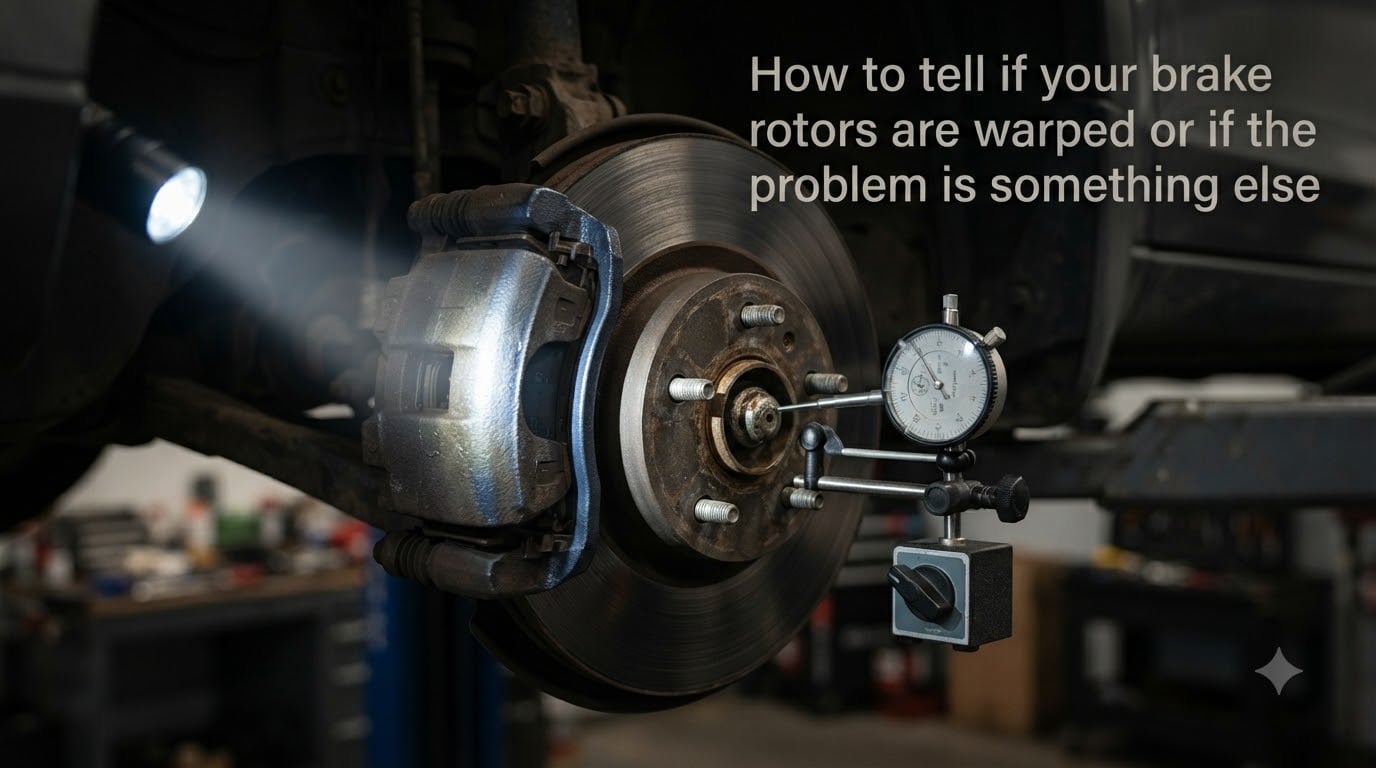
For a precise diagnosis, mechanics use a dial indicator mounted to the hub while rotating the wheel by hand. More than 0.005 inches of runout (lateral wobble) typically requires machining or replacement. Most DIYers won’t have this tool, but any shop should perform this test for free if you ask.
What Else Mimics Warped Rotors (The Usual Suspects)?
This is where most amateur diagnoses go wrong. Several other components create brake-like vibration, and replacing rotors won’t fix any of them.
Wheel Bearings
A worn wheel bearing produces humming or grinding that increases with speed and may turn into a vibration under braking load. Unlike rotor vibration, bearing noise continues even when you’re not braking. The classic test: with the car safely supported, spin the wheel by hand and listen for roughness, then grab the top and bottom of the tire and try to rock it – any play indicates a worn bearing.
Stuck or Sticking Calipers
A caliper that doesn’t release properly drags the pad against the rotor continuously. This creates heat, which leads to hot spots, which then mimics warped rotor symptoms. If one wheel feels noticeably hotter than the others after driving, suspect a sticking caliper. You may also notice uneven pad wear or the car pulling to one side.
Worn or Glazed Brake Pads
Overheated pads develop a hard glaze on their surface that reduces friction and creates inconsistent contact with the rotor. This feels like reduced braking power combined with vibration. The pads themselves may be fine thickness-wise, but the friction material is compromised.
Tire Issues
A separated tire belt, out-of-balance tire, or bent wheel creates vibration that’s worse at certain speeds and can intensify during braking because of the additional load. The test: does the vibration happen without braking? If yes, start with the tires before touching the brake system.
Suspension Components
Worn ball joints, tie rod ends, or control arm bushings allow geometry changes under braking load. The front end “dives” when you brake, which can expose worn suspension parts that don’t normally make noise. A quick bounce test on each corner reveals worn shocks or struts contributing to the issue.
When to Fix, Resurface, or Replace Rotors
If your diagnosis confirms actual rotor issues, you have three options depending on severity.
Resurfacing (machining) works when rotors are still above minimum thickness and have minor DTV. Most shops charge less than a replacement and the rotors often last another 30,000+ miles. The catch: very thin rotors cannot be machined safely.
Replacement is the right call when rotors are below spec, severely heat-checked, or have deep grooves. Quality rotors paired with quality pads typically cost more upfront but last longer and resist future DTV better than bargain options.
Sometimes the smartest move is replacing pads only. If the rotors look fine but the pads are glazed or worn, fresh pads will bed into the existing rotor surface and solve the vibration without touching the rotors at all.
FAQs
Can you visually tell if a brake rotor is warped?
Not really. DTV is measured in thousandths of an inch and isn’t visible to the naked eye. You can see obvious heat damage (blue discoloration), deep grooves, or heavy corrosion, but actual thickness variation requires a dial indicator to measure. Visual inspection alone catches maybe 20% of rotor problems.
What can mimic warped rotors?
The most common culprits are wheel bearings (humming that increases with speed), sticking calipers (one hot wheel after driving), worn or glazed pads (reduced stopping power), out-of-balance tires (vibration without braking), and worn suspension parts (noise over bumps plus brake vibration). Always rule these out before replacing rotors.
Can warped brake rotors be fixed?
Yes, in most cases. Minor DTV can be corrected by machining (resurfacing) the rotor on a brake lathe. The shop removes a thin layer of material to restore a perfectly parallel surface. This works as long as the rotor is still above the manufacturer’s minimum thickness specification, usually stamped on the rotor itself.
How long should rotors last before warping?
Quality rotors typically last 50,000 to 70,000 miles under normal driving conditions. Heavy use (towing, mountain driving, track days) shortens that to 25,000 to 40,000 miles. Aggressive pad compounds, frequent heavy braking, and cheap rotors all accelerate DTV formation.
Can warped rotors correct themselves?
No. Once a rotor has thickness variation or hot spots, it doesn’t wear back to true on its own. Normal driving actually makes DTV worse as the high spots continue contacting the pads more aggressively than the low spots. The only self-correction happens with very mild cases where pad wear eventually matches the uneven surface, but this takes tens of thousands of miles and isn’t reliable.
How expensive is it to fix warped brake rotors?
Resurfacing rotors typically costs less per axle than full replacement, while a complete rotor and pad replacement on both front wheels runs higher depending on vehicle and part quality. Prices vary widely by region and vehicle – import luxury cars cost more than domestic sedans. Always get a written diagnosis showing runout measurements before approving any brake work.
Final Thoughts on Diagnosing Brake Rotor Problems
How to tell if your brake rotors are warped comes down to symptom location, speed triggers, and ruling out other components first. Start by confirming the vibration only happens during braking, identify whether it’s in the steering wheel or pedal, and inspect for obvious heat damage or hot spots before assuming the rotors are bad. The majority of “warped rotor” diagnoses turn out to be wheel bearings, tire issues, or worn pads – and catching the real problem saves you hundreds in unnecessary parts.